
Connecting Tech Pros Worldwide Forums | Help | Site Map

VBA - Event Driven Programming

msquared's Avatar
Administrator
 
Join Date: Aug 2006
Location: Dublin, Ireland
Posts: 10,875
#1   Nov 26 '07
VBA is described as an Event driven programming language. What is meant by this?

Access, like most Windows programs, is an event driven application. This means that nothing happens unless it is in response to some event that has been detected by the application.

The steps are fairly straightforward:
  • An event happens
  • The event is detected by the application
  • The application responds to the event
The Windows OS will automatically detect when an event has occured, like a mouse move, mouse click, form load, etc. If the OS doesn't find a VBA procedure relating to that event it will just go with its default behaviour for that event. The programmer does not need to determine when a particular event happens as Windows does that for you. If you program a procedure to respond to that particular event, then it will override the default behaviour for that event. Therefore, the programmer only needs to code those events where something other than the default behavior should occur. For example, the default behaviour if a button is clicked is that the button gains focus. You only need to code any other tasks you wish to be performed when this event occurs.

Although the obvious event for a button is the Click (On Click) event there are actually 12 possible events associated with a button.

To code an event:

Right click on the object or control you wish to program an event for. Go to properties and go to the Event tab. Choose the event you wish to code e.g. On Click for a button control. Click on the builder button (the one with three dots) and select Code Builder from the list. This will open the Visual Basic Editor with the opening and closing lines of the event procedure already coded. Everything you put between these two lines will execute when the button is clicked.

Every form and report object can have events programmed on them, as can all the controls in those same forms and reports.

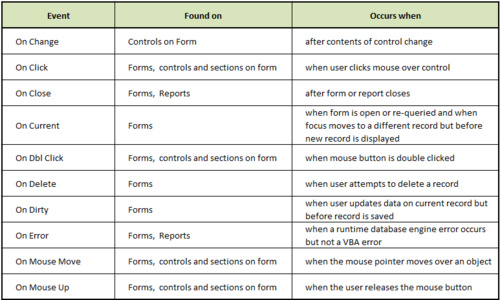
Below are some of the more common events with details of when they occur:
Expand|Select|Wrap|Line Numbers
  1. Event        Found on             Occurs when 
  2. On Change    Controls on Form        after contents of control change
  3. On Click    Forms, controls and         when user clicks mouse over control
  4.             sections on form
  5. On Close    Forms, Reports              after form or report closes
  6. On Current    Forms                                   when form is open or requeried and
  7.                                   when focus moves to a different record
  8.                                   but before new record is displayed
  9. On Dbl         Forms, controls and     when mouse button is double clicked 
  10. Click             sections on form
  11. On Delete    Forms                             when user attempts to delete a record
  12. On Dirty    Forms                     when user updates data on current record
  13.                                   but before record is saved
  14. On Error    Forms, Reports              when a runtime database engine error occurs
  15.                                   but not a VBA error
  16. On Mouse    Forms, controls and      when the mouse pointer moves over an object
  17. Move          sections on form
  18. On Mouse    Forms, controls and      when the user releases the mouse button
  19. Up                         sections on form
There are many more events but these should get you started.



Reply